Model Quantization · 01 · · 5 min read
IEEE 754 standard for Float.
A detailed explanation about how data is stored in float by explaining the engineering behind it.
Introduction
In a general unsigned int16 (16 bits) datatype, the biggest number we can store is 65,535 (1111111111111111). Now, if we apply these same rules to an unsigned Float32 (32 bits), the biggest number we can store is 4,294,967,295 (11111111111111111111111111111111). But the actual range of a float goes far beyond ~4,294,967,295, i.e. −3.4×10^38 to 3.4×10^38. So how do we actually store these huge, astronomical numbers in just 32 bits? This blog explains exactly that.
Two things to remember about float
- Float doesn't store a number in its raw binary form. It stores it in scientific notation form.
x = (−1)^sign × 2^(exponent − bias) × (1 + fraction)
- A float datatype has 3 parts to it, and each part gets a fixed number of bits.
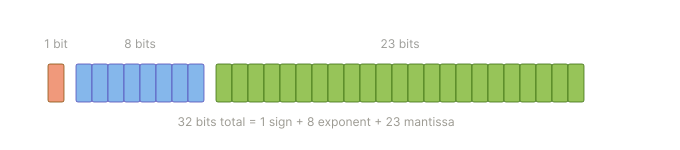
- Sign (1 bit): decides whether the number is positive (0) or negative (1).
- Exponent (8 bits): sets the scale of the number (how far the decimal point moves). This is what lets it handle massive ranges (~10^38).
- Mantissa (23 bits): stores the actual digits of the number.
Throughout this blog, the three fields are color-coded the same way as the figures above, so you can always tell which bits belong where:
To understand it more clearly, let's take a number and see how it actually gets stored in a float.
Let's take the number 135,000. The scientific notation for this number is 1.35×10^5.
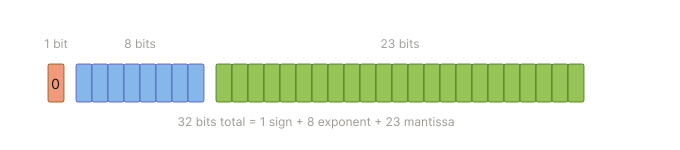
Sign
This is a positive number, so the sign of this number is 0.
Exponent
Two rules to remember
- Computers can only store 0's and 1's (binary).
- The exponent field stores only positive whole numbers, so it needs a trick to represent negative exponents.
Since computers only work with 1's and 0's, storing 1.35×10^5 means we first have to convert it into binary notation.
Step 1
Get the whole number out of the notation.
1.35 × 10^5 = 135,000
Step 2
Convert the decimal number into a binary number.
135,000 = 100000111101011000
Step 3
Right now, the decimal point sits at the very end of our binary number: 100000111101011000.0
Just like we do in base-10, we need to shift that decimal point all the way to the left until there is exactly one 1 in front of it. To do that, we move the decimal point 17 places to the left:
1.00000111101011000 * 2^17
Step 4
Before saving it, the hardware needs us to add a bias of 127 to that 17, so it can also handle negative exponents when needed.
Why add 127? They call it the Biasing Trick.
The Biasing Trick
Out of the 32 bits of storage, the Exponent (E) gets 8 bits.
That means 2^8 = 256, so we can store values from 0 to 255. If we used those numbers directly, our exponent could only ever be positive (2^0 up to 2^255).
That would let us store massive numbers, but we could never store a fraction smaller than 1.0 (like
0.005). To store tiny fractions, we need negative exponents (like 2^-5).So we need to split our 0-to-255 range so that half of the numbers represent negative powers and the other half represent positive powers.
To find the perfect middle point, we take the maximum value we can store, which is 255, and divide it by 2:
255 / 2 = 127.5Since computers work with whole integers, the IEEE 754 standard rounded this down to 127 and used it as the "bias" (the baseline zero point).
This gives us a perfect balance:
- Any stored value less than 127 automatically becomes a negative exponent.
- Any stored value greater than 127 automatically becomes a positive exponent.
- The smallest powers (fractions): the smallest in bits is
00000001, so the math is 1 − 127 = −126, i.e. 2^-126.- The middle point (zero): the middle in bits is
01111111, so the math is 127 − 127 = 0, i.e. 2^0 = 1.- The largest powers (big numbers): the biggest in bits is
11111110, so the math is 254 − 127 = +127.
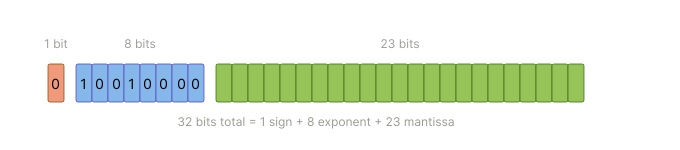
Based on that, we add the bias to get Exponent (E) = 17 + 127 = 144.
Now, if we convert 144 into 8-bit binary, we get 10010000.
Mantissa
Now we take the base number in binary form, which is 1.00000111101011000.
From this number we only store 00000111101011000 and drop the leading 1. But why? That credit goes to the Hidden Bit Trick.
The Hidden Bit
In standard scientific notation, the rule is that you must shift the decimal point until there is exactly one non-zero digit to the left of the decimal point. In the decimal system that digit could be anything — 2.34, 1.48, 3.50, 8.3330, and so on. But if we apply the same rule to the binary system, the only non-zero digit that exists is
1, and it never changes — it is mathematically impossible to get any other digit there.Since it always starts with 1, the engineers who designed the float standard (IEEE 754) realised that storing that 1 bit is a waste of memory, and they let the hardware add it back during the math instead.
By making one bit invisible, they effectively turned 24 bits of data into 23 bits.
Because of this, we end up with 00000111101011000, and once we pad this 17-bit value out to 23 bits, we get 00000111101011000000000.
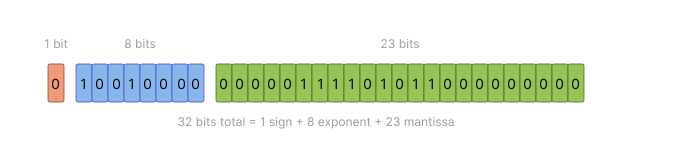
And this is how the number 135,000 finally lands in a float, all three fields side by side:
Conclusion
We usually don't learn this when we pick up a programming language, because the goal there is to keep you focused on the language, its syntax, and so on. But once you step into the AI and systems world, these concepts play a key role in squeezing out the maximum efficiency and getting a model to run on any kind of hardware. In the next article, we'll explore how quantizing this datatype affects the size, speed and efficiency of a model.
End of series